Trying to run an appimage on Linux Mint's Nemo that hasn't been given the executable permission will fail silently.
I consider this to be a pretty ridiculous behavior as it's not hard to imagine the sane behavior in this situation would be to tell the user they can't run the appimage because it hasn't been made executable, and ask them whether they want to make it executable so they can run it.
Can you imagine how many hours of people's times have been wasted going to Google search for how to run an appimage on Linux just because somebody couldn't be bothered to write a single if statement and a dialog box in a file manager?
More specifically, Nemo's behavior when a file isn't executable is to open it in the application associated with it. For some reason, the application associated with appimages by default is the Disk Image Mounter, so if you just double click on it, the Disk Image Mounter runs (supposedly), and then it just does nothing.
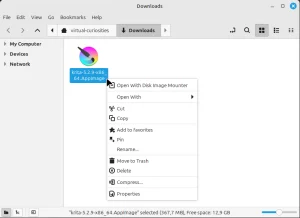
To be frank, I don't have the slightest idea of what this Disk Image Mounter is doing and I'm not going to waste my time bothering to find out. It isn't my fault that I don't know what is happening—I'm just a user—it's the developers' fault for not telling me what their program is doing on my computer.
Video
For reference, a video of what will happen when you first encounter an appimage on Linux.