How to Highlight the Row and Column of the Current Cell in LibreOffice Calc

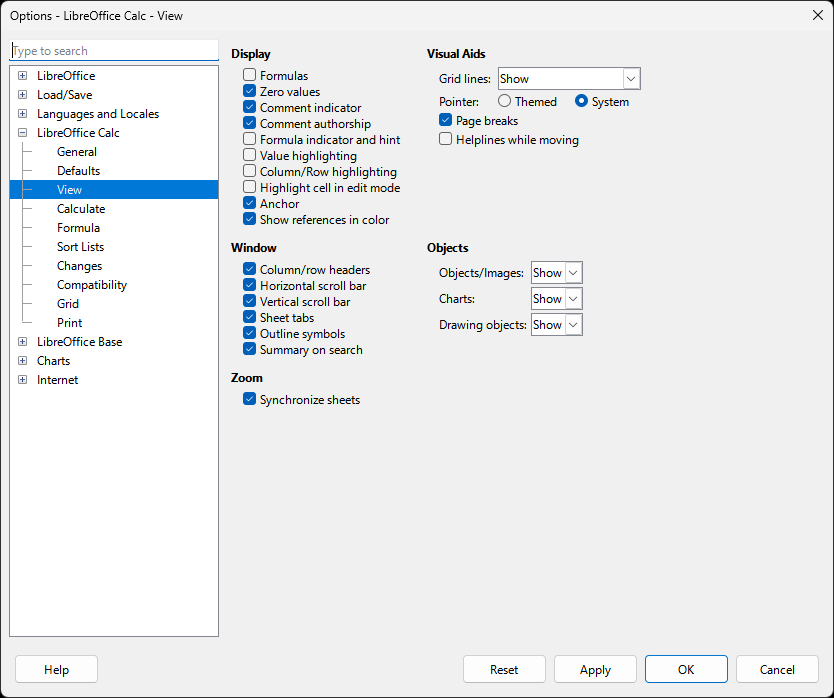
LibreOffice Calc: "LibreOffice Calc -> View" Options Dialog (2025)

Share
A dialog window titled "Options - LibreOffice Calc - View." It has a list-detail layout. On the side pane, LibreOffice Calc -> View is selected. On the main pane, the settings: Display: Formula (unchecked); Zero values (checked); Comment indicator (checked); Comment authorship (checked); Formula indicator and hint (unchecked); Value highlighting (unchecked); Column/Row highlighting (unchecked); Highlight cell in edit mode (unchecked); Anchor (checked); Show references in color (checked); Window: Column/row headers (checked); Horizontal scroll bar ( checked); Vertical scroll bar (checked); Sheet tabs (checked); Outline symbols (checked); Summary on search (checked); Zoom: Synchronize sheets (checked); Visuai aids: Grid lines ("Show"); Pointer: themed or system (system checked); Page breaks (checked); Helplines while moving (unchecked); Objects: Objects/images ("Show"); Chatrs ("Show"); Drawing objects ("Show"). Five buttons: Help, Reset, Apply, OK, Cancel.

Description

The View options of LibreOffice Calc.

Metadada

File Type
image/webp
File Size
11.7KiB
Resolution
834x698px

View Comments