Note: If an Appimage Fails to Load, No Error Message is Shown to the User on Linux Mint

Share

On Linux Mint, it's possible for an appimage to fail to load if it's missing a dependency, in which case it will just fail silently, not telling the user that it has crashed.

Note: this is different from the other and more common way appimages will fail silently.

In this case, it's possible to view the error message by running the appimage from the terminal, e.g.:

./krita.appimage
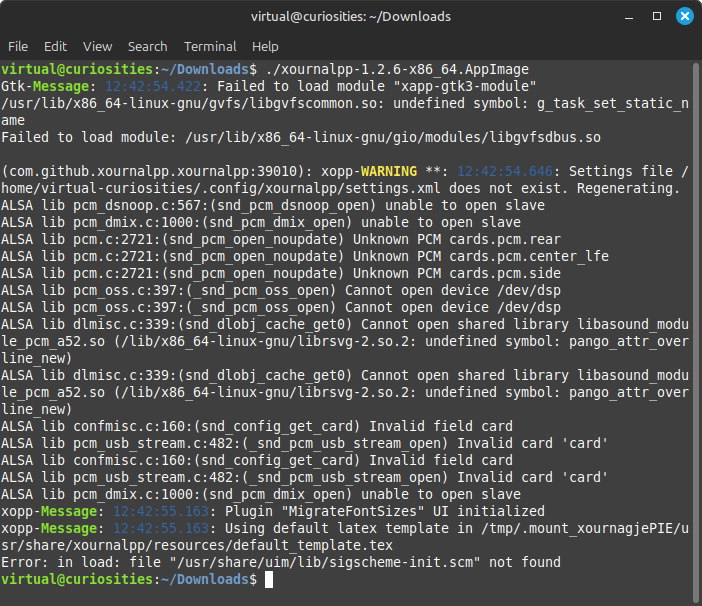
A terminal window displaying the output of running ./xournalpp-1.2.6-x86_64.AppImage: Gtk-Message: 12:42:54.422: Failed to load module "xapp-gtk3-module" /usr/lib/x86_64-linux-gnu/gvfs/libgvfscommon.so: undefined symbol: g_task_set_static_name Failed to load module: /usr/lib/x86_64-linux-gnu/gio/modules/libgvfsdbus.so (com.github.xournalpp.xournalpp:39010): xopp-WARNING **: 12:42:54.646: Settings file /home/virtual-curiosities/.config/xournalpp/settings.xml does not exist. Regenerating. ALSA lib pcm_dsnoop.c:567:(snd_pcm_dsnoop_open) unable to open slave ALSA lib pcm_dmix.c:1000:(snd_pcm_dmix_open) unable to open slave ALSA lib pcm.c:2721:(snd_pcm_open_noupdate) Unknown PCM cards.pcm.rear ALSA lib pcm.c:2721:(snd_pcm_open_noupdate) Unknown PCM cards.pcm.center_lfe ALSA lib pcm.c:2721:(snd_pcm_open_noupdate) Unknown PCM cards.pcm.side ALSA lib pcm_oss.c:397:(_snd_pcm_oss_open) Cannot open device /dev/dsp ALSA lib pcm_oss.c:397:(_snd_pcm_oss_open) Cannot open device /dev/dsp ALSA lib dlmisc.c:339:(snd_dlobj_cache_get0) Cannot open shared library libasound_module_pcm_a52.so (/lib/x86_64-linux-gnu/librsvg-2.so.2: undefined symbol: pango_attr_overline_new) ALSA lib dlmisc.c:339:(snd_dlobj_cache_get0) Cannot open shared library libasound_module_pcm_a52.so (/lib/x86_64-linux-gnu/librsvg-2.so.2: undefined symbol: pango_attr_overline_new) ALSA lib confmisc.c:160:(snd_config_get_card) Invalid field card ALSA lib pcm_usb_stream.c:482:(_snd_pcm_usb_stream_open) Invalid card 'card' ALSA lib confmisc.c:160:(snd_config_get_card) Invalid field card ALSA lib pcm_usb_stream.c:482:(_snd_pcm_usb_stream_open) Invalid card 'card' ALSA lib pcm_dmix.c:1000:(snd_pcm_dmix_open) unable to open slave xopp-Message: 12:42:55.163: Plugin "MigrateFontSizes" UI initialized xopp-Message: 12:42:55.163: Using default latex template in /tmp/.mount_xournagjePIE/usr/share/xournalpp/resources/default_template.tex Error: in load: file "/usr/share/uim/lib/sigscheme-init.scm" not found
The error output that only appears when you run the Xournal++ official appimage from the terminal.

This isn't ideal and I expect to see an actual error dialog when an application fails to load like this. Windows has always been able to tell when this happens.

An error message dialog box titled "inkscape.exe - System Error." It reads: The code execution cannot proceed because liblcms2-2.dll was not found. Reinstalling the program may fix the problem. It has an OK button.
An error message dialog box displayed when liblcms2-2.dll isn't found on Windows 11, preventing Inkscape from starting.
Written by Noel Santos.

About the Author

I'm a self-taught Brazilian programmer graduated in IT from a FATEC. In a world of increasingly complex and essential computers, I decided to use my technical expertise in hardware, desktop applications, and web technologies to create an informative resource to make PC's easier to understand.

View Comments