How to See Who You Blocked on Reddit

Share
In this tutorial, we'll learn how to view a list of users that you've blocked on Reddit. This is helpful if you blocked someone by accident and forgot whom, so you can unblock the.

To do this, follow the following steps:

1: click on your profile picture on the top-right corner to open the profile menu.
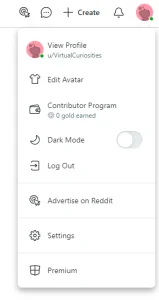
A dropdown menu with the options: View Profile, Edit Avatar, Contributor Program (0 gold earned), Dark Mode, Log Out, Advertise on Reddit, Settings, and Premium.
The profile dropdown menu on Reddit.

2: click on Settings.

3: click on the Privacy tab.
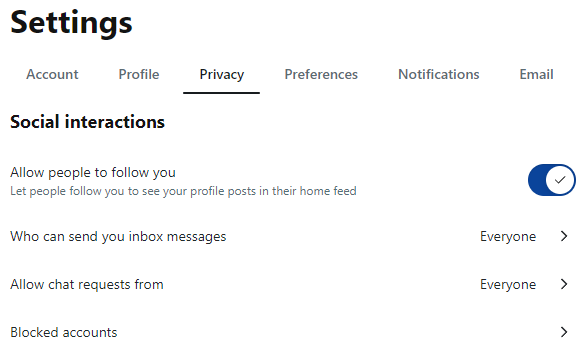
A page titled "Settings" with the tabs: Account, Profile, Privacy (Selected), Preferences, Notifications, Email. Section: "Social interactions." A switch to "allow people to follow you (let people follow you to see your profile posts in their home feed);" option "Who can send you inbox messages," "Everyone;" "Allow chat requests from," "Everyone," "Blocked Accounts."
The "Social Interactions" of the "Privacy" in Reddit settings.

4: click on Blocked accounts. A dialog box will appear showing a list of accounts you've blocked.

A dialog box titled "Blocked accounts." "Accounts you block won't be able to access your profile or see or reply to your posts or comments in communities." A text box that reads "Block new user." A list with one user: VirtualCuriosities, with an "X" button at its right. Two buttons at the bottom: Save and Cancel.
The dialog box that lists your "Blocked accounts" on Reddit.

Optional: clicking on the "X" button next to the account removes the account from the block list (unblocks the user).

Written by Noel Santos.

About the Author

I'm a self-taught Brazilian programmer graduated in IT from a FATEC. In a world of increasingly complex and essential computers, I decided to use my technical expertise in hardware, desktop applications, and web technologies to create an informative resource to make PC's easier to understand.

View Comments