Why is the "Disk" Called "Disk" if it isn't a Disk?

Share

Most likely, the reason why the disk in the computer is called "disk" in phrases like "save to disk" even though it isn't a disk is that PCs were popularized at a time when all mass storage media were disks: we had floppy disks, hard disks, and compact disks (CDs), which were all circular and flat like you would expect from a disk.

A plastic disk with a rainbow-like reflection on it. Printed on it the words: Verbatim Velocity Pro CD-R.
A CD-R. Photo: abdallahh on Flickr. License: CC BY 2.0.
A black plastic rectangle with a rectangular metal part at the top and a metal circle at the center.
A diskette. [Why are floppy disks rectangular?]. Photo: Ivan Radic at Flickr. License: CC BY 2.0.
Photo of a metal disk attached to a rectangular electronic device.
A hard disk drive with its cover removed, revealing the hard disk within. Photo: Uwe Hermann. License: CC BY-SA 2.0.
A Windows 11's File Explorer window, showing a tab labelled "This PC." On the sidebar, "This PC" is selected. The main pane has a group labelled "Devices and drives" with one item labelled "Local Disk (C:)." An over than half filled blue bar. Under it: 247 GB free of 931 GB.
The "This PC" location on Windows 11. Under "Devices and drives" it says I have a "Local Disk." The "disk" in this case is an SSD.

Example of Disks that Aren't Disks

Before hard disks, there were non-disk-shaped non-volatile mass storage media like tapes, which were rolled by tape drives. Nowadays, we often use non-volatile flash memory, so there are no disks actually involved.

SSDs

For example, you may still see the phrase "save to disk" used when you are saving to an SSD (a solid state drive), even though an SSD contains no actual "disk" in it just like it contains no actual "drive" in it. Both terms come from past technologies.

Although hard disks are still used today, in the past all we had were hard disks. We didn't have SSDs. Nowadays, sometimes a PC only has an SSD and no hard disk, meaning some computers don't have any disks installed inside them at all.

Personally, I think it makes sense to use the term "disk" despite this because otherwise you'll still have to say something, and you'll have to choose one of these:

  1. Save your files to your mass storage device.
  2. Save your files to your file system.
  3. Save your files to your hard disk or SSD, or to your tapes if you have them.

It's much easier to just say "save to disk."

USB Flash Drives

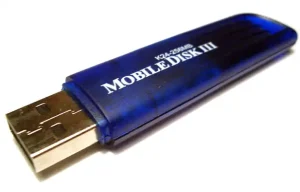
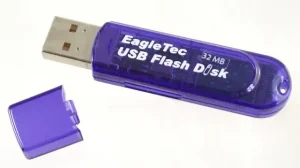
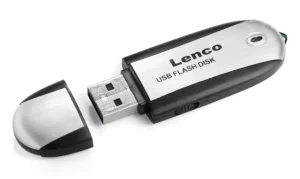
Sometimes you see USB flash drives like M-Systems' "Disk-on-Key," TwinMOS's "Mobile Disk," or EagleTec's "USB Flash Disk," that don't contain any physical disks either but have the word "disk" in their names.

A metallic ring attached to a plastic cap, nest to a matching small electronic device with a USB plug sticking out of it. Text on the two parts read: IBM, DiskonKey™, Assembled in the USA.
IBM's DiskonKey™. Photo: Ianturo on Wikimedia. License: CC BY 4.0.
A small blue semi-transparent plastic electronic device with a metallic USB plug sticking out of it. White text on it reads K24-256MB Mobile Disk III.
A Mobile Disk III. Photo: Sherool on Wikimedia. License: CC BY SA 3.0.
A purplish blue semi-transparent plastic electronic device with a USB plug sticking out of it. White text printed on it reads: EagleTec USB Flash Disk 32 MB.
An EagleTec's USB Flash Disk. Photo: Museum of Obsolete Media. License: CC BY-SA 4.0.
A small black and white electronic device with a USB plug sticking out of it. Text in black reads Lenco USB FLASH DISK.
A USB Flash Disk. Photo: JB Productions / Justin Beaudoin on Wikimedia. License: CC BY SA 3.0.
Written by Noel Santos.

About the Author

I'm a self-taught Brazilian programmer graduated in IT from a FATEC. In a world of increasingly complex and essential computers, I decided to use my technical expertise in hardware, desktop applications, and web technologies to create an informative resource to make PC's easier to understand.

View Comments