Solid State Drive

Share

What is a Solid State Drive?

A solid state drive (abbreviated SSD) is a common mass storage device similar to a hard disk drive (HDD) that is installed inside the computer's tower that reads and writes data to non-volatile flash memory.

Images

For reference, some images of solid state drives so you know what a solid state drive looks like.
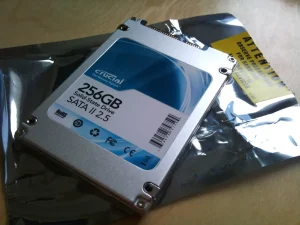
A rectangular, blocky device. Connects at its top. On it, written: 256 GB Solid-State Drive, SATA II 2.5. The Crucial logomark can be seen. Under it a black plastic bag slightly larger than the device.
A SATA solid state drive. Photo: Karl Baron on Flickr. License: CC BY 2.0.
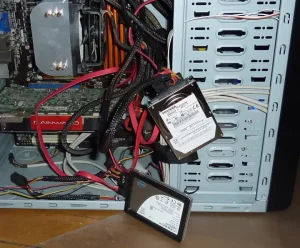
A PC case opened, various cables coming out of it. Thick black cables and red flat cables connect to two devices hanging out of the PC by the cables. The first device is a thick metallic rectangular block that reads "Toshiba." The second is flatter and has the Intel logomark.
A hard disk drive (larger, thicker drive) and a solid state drive (smaller, flatter drive) connected to a PC. The red cables are SATA data cables. The black cables are sleeved SATA power cables. Photo: Gilly on Flickr. License: CC BY 2.0.
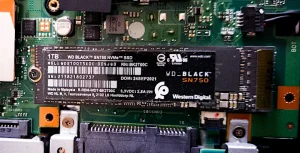
A green motherboard with a black chip on top of it. On the left side a screw keeps the chip in place. The text on the chip reads 1 TB, WD Black™ SN 750 NVMe™ SSD. It has the Western Digital logomark. It's not clear if the chip is connected or not, as it seems to be just placed flat over the motherboard.
An NVMe solid state drive. Photo: Kent Madsen on Wikimedia. License: CC BY-SA 2.0.
Written by Noel Santos.

About the Author

I'm a self-taught Brazilian programmer graduated in IT from a FATEC. In a world of increasingly complex and essential computers, I decided to use my technical expertise in hardware, desktop applications, and web technologies to create an informative resource to make PC's easier to understand.

View Comments