Virtual Curiosities

  • Websites
    • Search Engines
    • Social Media
  • Applications
    • For Digital Art
  • Tutorials & Tips
    • The Basics
    • Windows
    • GIMP
    • Krita
    • Inkscape
    • DaVinci Resolve
    • OBS Studio
    • WordPress (PHP Programming)
  • Reference
    • Hardware (Concepts)
    • Names of Computer Parts
    • Software (Concepts)
    • File Extensions
    • User Interfaces
    • Images & Image-Editing (Concepts)
    • Video & Video-Editing (Concepts)
    • Games (Terminology)
    • Internet (Concepts)
Comparison: Affinity Designer vs. Inkscape.

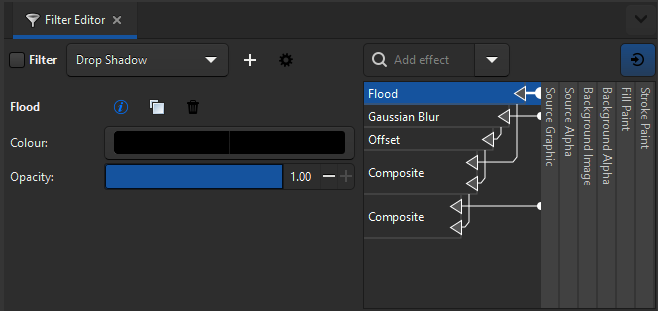
Inkscape: Filter Editor Example for a "Drop Shadow" Effect (2024)

Share
2024-12-11
A panel titled "Filter Editor," in it, a dropdown list button reads "Drop Shadow." On the right, a search box reads "Add effect," and under it a complex UI with arrows coming from the side where text written rotated 90 degrees can be seen. The rotate text reads "Stroke Paint," "Fill Paint," "Background Alpha," "Background Image," "Source Alpha," "Source Graphic." The arrows point to items labelled "Flood" (selected), "Gaussian Blur," "Offset," "Composite," and "Composite." On the left, properties of the selected "Flood" item can be see, including Colour and Opacity.

Description

The "Filter Editor" panel on Inkscape showing a drop shadow effect applied.

Metadada

File Type
image/webp
File Size
8.2KiB
Resolution
658x311px

Related Articles

  • Comparison: Affinity Designer vs. Inkscape.

Share this page: send it to your friends!

View Comments

About the Site

  • Sitemap
  • Privacy Policy

Follow

Main Content © Virtual Curiosities 2023–2024.
Some Resources © Their Respective Authors.
Made with WordPress.