Virtual Curiosities

  • Websites
    • Search Engines
    • Social Media
  • Applications
    • For Digital Art
  • Tutorials & Tips
    • The Basics
    • Windows
    • GIMP
    • Krita
    • Inkscape
    • DaVinci Resolve
    • OBS Studio
    • WordPress (PHP Programming)
  • Reference
    • Hardware (Concepts)
    • Names of Computer Parts
    • Software (Concepts)
    • File Extensions
    • User Interfaces
    • Images & Image-Editing (Concepts)
    • Video & Video-Editing (Concepts)
    • Games (Terminology)
    • Internet (Concepts)
How to Block Words on Bluesky

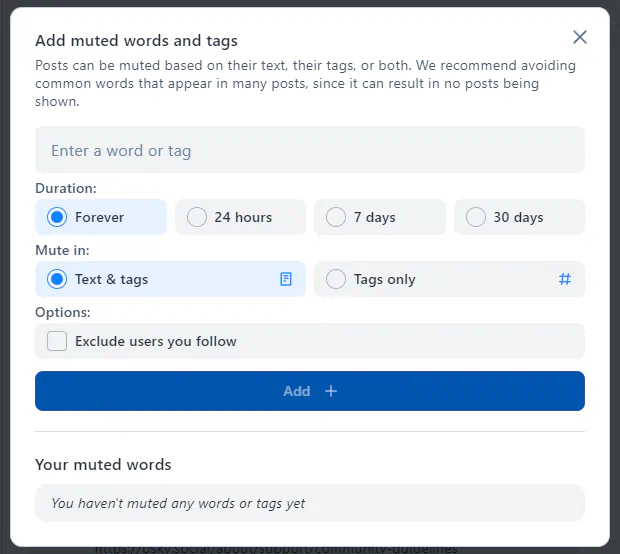
Bluesky: "Add muted words and tags" Dialog Box

Share
2024-09-27
A dialog box with the title "Add muted words and tags." A message: "Posts can be muted based o ntheir text, their tags, or both. We recommend avoiding common words that appear in many posts, since it can result in no posts being shown." A field that says "Enter a word or tag." Options for "Duration:" Forever, 24 hours, 7 days, 30 days. Options for "Mute in:" Text & tags, Tags only. Other "Options:" Exclude users you follow. A button "Add." A section "Your muted words," "You haven't muted any words or tags yet."

Description

The dialog box "Add muted words and tags" on Bluesky.

Metadada

File Type
image/webp
File Size
18.6KiB
Resolution
620x554px

Related Articles

  • How to Block Words on Bluesky

Share this page: send it to your friends!

View Comments

About the Site

  • Sitemap
  • Privacy Policy

Follow

Main Content © Virtual Curiosities 2023–2024.
Some Resources © Their Respective Authors.
Made with WordPress.