Yesterday, I decided to write some SeExpr scripts for Krita and I publish them on GitHub, something I had done previously, but it turned out much harder than what I expected it to be.
The first thing I did was create the repository on GitHub. It lets me select a license, so I selected MIT, and then it created a repository that wasn't empty, but instead had the MIT license already written inside a LICENSE file.
I go to my file manager and create a new folder for my repository, opening the terminal inside the folder and typing the following command:
git clone URL .Where URL is the URL I copied from the repository page on GitHub (e.g. https://github.com/virtualcuriosities/SeExpr-files-for-Krita.git), and the dot (.) means it will be cloned inside the current directory.
I write the scripts, git add everything, git commit, and then I git push origin main to push the changes in the main branch to the origin.
The terminal asks me my username and password, so I just use my GitHub username and password, and then it doesn't work.
Username and password isn't supported anymore.
What? I just want to push my code. I do understand the security issues when everyone is cloning left-pad.rs and the sort straight from GitHub, but I just want to push some cute, harmless SeExpr scripts to a repository nobody is ever going to visit. Just let me push the code.
Okay, fine, so how do I git push?
It turns out the GitHub documentation pretty much assumes that you are using GitHub's CLI. I don't want to install GitHub's CLI just to git push because I already have a program that can git push, it's called git push. To make matters worse, it's pretty difficult to find a tutorial teaching how to git push WITHOUT the CLI when the CLI is just called CLI. This isn't a Docker situation with a dichotomy between application and terminal, it's terminal or terminal.
The first issue I had was creating an authentication token. Since you can't use a password, naturally you need a token that works like a password with limited authority. So I took the most obvious and straightforward path to where the ability to create tokens should be.
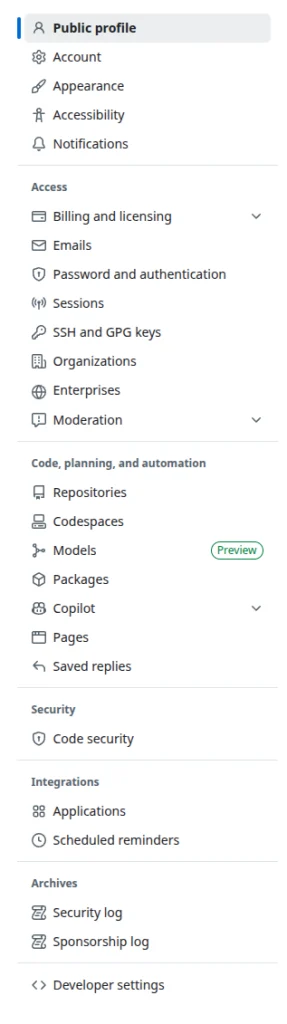
I clicked on my avatar to display the drop down menu, then on settings, went to the side bar, clicked on "password and authentication," because that is obviously where authentication tokens should be.
But there is no tokens here. Where are my tokens, GitHub?
I spent a few minutes trying to figure out where in the world is the "Personal Access Tokens" page I read about, because it didn't seem to be anywhere. I even assumed it was from a previous design of GitHub and they had moved it somewhere else because I truly couldn't find it on my own.
Can you believe that this is actually the LAST item in the sidebar? And that it's inside a section called "Developer settings"? On GitHub? A website that is literally only for developers? How is the whole settings not "Developer settings" when there are only developers on this website? It's such an insane afterthought that there isn't even a section label on top of it. They just put a horizontal line (<hr>?) to separate it from the Archives items and threw it at the bottom. What is up with this? I wonder if I was simply supposed to get to that page in some other way?
I managed to create a personal access token that has the content writing permission for my repository. The reason I'm writing this article is that the token expires in 30 days by default, so I'll probably need to read this to figure out how to do it again.
Now that i have a personal access token, how do I use it with git push? I found some convoluted tutorials about it that included setting a different URL for the origin including the token in the URL. Obviously I don't want to do this because the token expires in 30 days so I'll have to figure out how to change the remote URL as well 30 days later. That's too many things to have to relearn just to post code to the Internet.
It turns out that all you need to do is use the personal access token as your username when you are asked for username and password in the terminal after you git push, and for the password you just press the enter key to leave it blank.
I'm not sure if this is safe or not but at least it works and now my scripts are online.
By the way, I didn't notice this before, but it seems that while you are logged in GitHub you have access to an SSH URL to clone the repository. Presumably if you use this SSH URL as the origin instead of the HTTPS URL you can avoid all of these problems, so long as you set up your SSH key in your account. Maybe I'll try to do this next time.