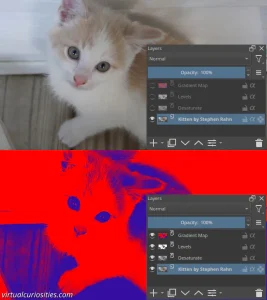
What is a "Gradient Map" in an Image Editor?
Gradient map is a filter commonly found in image editors that maps the colors of one layer to a specified gradient according to their lightness.

How the Gradient Map Filter Works?
Let's say we have a gradient that goes from red to blue. We say that red is 0% and blue is at 100% in respect to the full length of the gradient. Purple would be at the 50% position of the gradient, since it's between both extremes. Then all we need to do is calculate a value from 0% to 100% for every pixel of the image.
The algorithm to calculate the gradient position of a pixel's color is normally simply taking its lightness. In other words, black pixels are mapped to the position 0%, and white pixels are mapped to the position 100%. Everything between black and white gets mapped to some position in the middle of the gradient.
Tricks
Controlling Extremes Before Mapping
An easy method to control the extremes of a gradient map before the gradient map filter is applied, specially useful in non-destructive editing, is to use a Levels filter to
Non-Lightness Mapping
Although it's theoretically possible to map to the gradient using other values than lightness (e.g. use only the value of the red color channel to compute the position of the color in the gradient), normally image editors don't allow you to select any specific method. To achieve this, we must use a different filter to create a lightness-based image from the values we want before before we use the gradient map filter, e.g. by using color adjustment curves to remove blue and green.
Examples of Gradient Map in Use
Some examples of effects of effects created with gradient map: