Virtual Curiosities

  • Websites
    • Search Engines
    • Social Media
  • Applications
    • For Digital Art
  • Tutorials & Tips
    • The Basics
    • Windows
    • GIMP
    • Krita
    • Inkscape
    • DaVinci Resolve
    • OBS Studio
    • WordPress (PHP Programming)
  • Reference
    • Hardware (Concepts)
    • Names of Computer Parts
    • Software (Concepts)
    • File Extensions
    • User Interfaces
    • Images & Image-Editing (Concepts)
    • Video & Video-Editing (Concepts)
    • Games (Terminology)
    • Internet (Concepts)
  • PPI

    Pixels per inch: the amount of pixels of a digital image or physical screen that occupy 1 inch of physical space.
  • DPI

    Dots per inch (or pixels per inch). Term used when measuring the resolution of something, such as digital images, monitor screens, mouses, drawing tablets, and scanners.
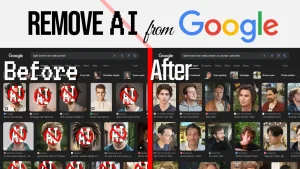
  • How to Remove AI Images from Google Results

    5 methods to remove Ai-generated images (genAI, or "AI art") from Google Image search.
  • SVG

    Common image format (file extension: .svg) used for creating scalable graphics, also called vector images, specially icons.
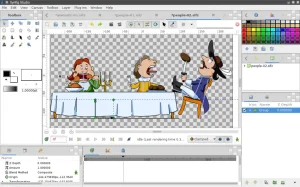
  • Synfig

    Freeware
    Linux
    macOS
    Open Source
    Windows
    Free digital art application for creating 2D animations available for Windows, Mac, and Linux.
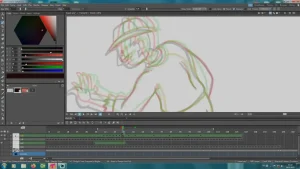
  • Tahoma2D

    Freeware
    Linux
    macOS
    Open Source
    Windows
    Free digital art application for creating animations available for Windows and Linux, featuring a timeline and palette support.
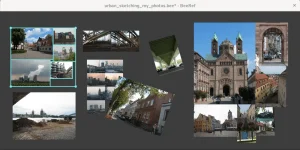
  • BeeRef

    Freeware
    Linux
    macOS
    Open Source
    Windows
    Free digital art utility application for Windows and Linux that lets you create a collage or board of reference images for drawing by dragging and dropping them in an infinite canvas.
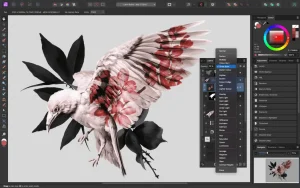
  • Affinity Photo

    Paid image editor available for Windows and Mac.
  • Photoshop

    Paid image editor available for Windows and Mac, capable of photo editing, graphics design, and animation.
  • An Introduction to Krita

    An introduction to Krita for beginners: the basics of using Krita; common issues, workflow and workarounds; a review of Krita's features; and a comparison of Krita with similar software like Clip Studio Paint, Paint Tool SAII, and FireAlpaca.
  • How to Adjust the Brightness and Contrast of Images in Krita

    Tutorial
    Tutorial: learn how adjust the brightness and contrast of images and photos in Krita (version 5.2).
  • How to Make a Photo Monochromatic in Krita

    Tutorial
    Tutorial: learn how to make make a photo monochromatic (monotone) in Krita (version 5.2).
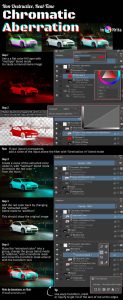
  • How to Add Chromatic Aberration in Krita (Non-Destructive Effect)

    Tutorial
    Tutorial: learn how to create a chromatic aberration effect in non-destructive manner in Krita (version 5.2) using clone layers, transform mask, layer groups, and filter layers (or filter masks).
  • Chromatic Aberration

    Chromatic aberration is a distortion in photography that creates a "color fringe" effect, typically red, orange or magenta and blue, violet or purple colors.
  • HSL

    Way to represent a color using three numeric values: Hue, Saturation, and Lightness.
  • Download

    What does it mean "To Download" from the Internet? To download something from the Internet has multiple meanings, some more technical than others. Technically, any time data is being transferred from a computer somewhere on the planet to your computer through the Internet, we say that your computer is downloading data from the Internet. This […]
  • Clipboard

    Where things that are copied (or cut) go before being pasted.
  • How to Paste as New File in Krita

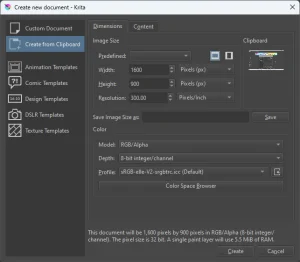
    You can create a new document in Krita from the clipboard in File -> New..., then Create from Clipboard.
  • To Overwrite

    What is "To Overwrite" in the Computer? Overwriting means to replace data that existed somewhere in the computer with other data. When this is done, the original data is lost, that is, it's as if the old data was deleted to make space for the new data which would be placed exactly in the same […]
  • How to Read Math in Code in This Website

    Sometimes, articles on this website use math, which is terrifying. I'm not a mathematician. I'm a programmer. Consequently, the way math is written on the articles is based on how math looks like in programming languages, and it may look different from what you would see normally. Mathematical Symbols + Addition: 1 + 2 = […]
←Previous Page Next Page→

About the Site

  • Sitemap
  • Privacy Policy

Follow

Main Content © Virtual Curiosities 2023–2024.
Some Resources © Their Respective Authors.
Made with WordPress.