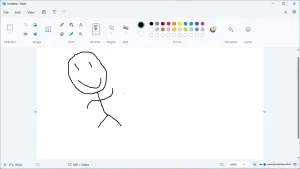
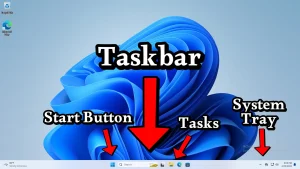
Bar A narrow horizontal or vertical rectangle on the screen that indicates some sort of information or contains widgets that you can interact with.
Tooltip A short message that appears when you hover a graphical user interface element for a few moments.
Toolbar A horizontal bar found in a window that has multiple tool buttons and other controls to change the behavior of the tools.
Dropdown Menu A kind of floating menu that appears when you click a button on the screen, called this way because they generally slide downward.
Context Menu A menu that appears when you right click on something, or when you press the menu key on your keyboard.
Keyboard Shortcut A key or combination of keys in the keyboard that when pressed makes an application execute a command that would normally require clicking on a button or on a menu with the mouse, e.g. Ctrl+O, Alt+F4.
How to Save a File Tutorial How to use the menu File -> Save, Save as, Save a copy, and Export, and how to use save file dialogs.
Tutorials for Basic Computer Operations List Basic tutorials for operating a computer, specially one with Windows installed.
Ribbon A rectangular area under the menubar of an application's window that contains several tool buttons grouped into sections and tabs.
Taskbar A horizontal bar typically at the bottom of the screen where tasks (applications currently running) can be found.
Address Bar Horizontal bar with a text box that displays the current location's address typically found at the top of a window of an application that can navigate from one place to another, such as web browsers and file managers.
Menubar A horizontal menu found in the main window of an application, typically located between the titlebar and the toolbar.
Start Menu A menu found in Windows and other operating systems that provides a way to find and open all applications and utilities installed in the computer.
Menu An user interface element that displays a list of options (called menu items) for the user to select.