Recently, I've been making a tiny billiards web browser game, because I've played this type of game several times, and one thing that has always bugged me about them is that there is a trajectory line that previews where the white ball will go, but it doesn't show where the other balls will go, or doesn't show where the white ball will go after hitting another ball or a wall. I wanted to make a game that just showed everything that is going to happen before it happened.
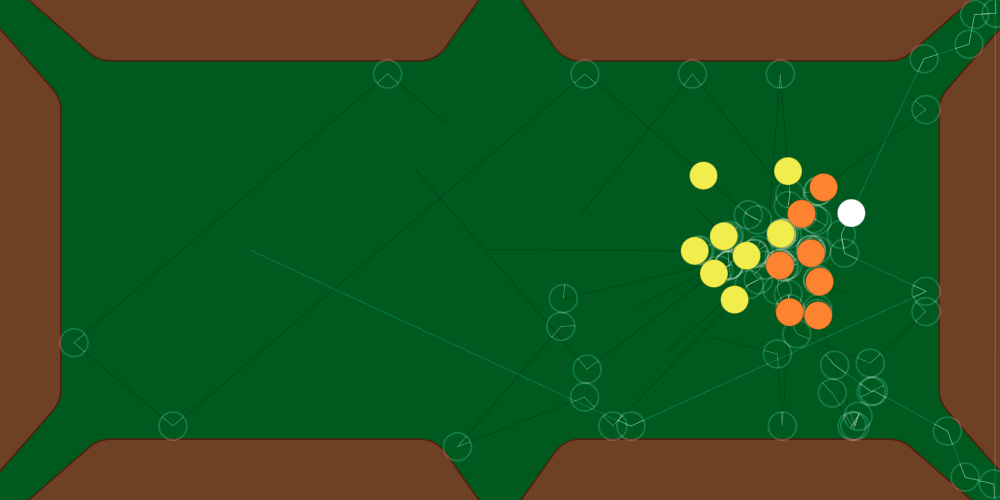
Assuming that computers are truly deterministic, that sounds like a simple feat on surface: simply run the physics simulation once with a given angle and power, and then when the player actually hits the ball, run the same simulation again. But I wasn't very sure about that, so I took a different approach: run the simulation, record ALL steps in a vector, then instead of doing the physics again, the balls are simply moved according to what was theorized that should happen. This way it's impossible for theory and practice to differ, since practice merely plays back what was already simulated.
Since I was simulating around 1000 steps of collisions each frame, I thought I might need some performance improvements later. I decided to start by using Rust and WebAssembly, which would give me more freedom to optimize performance if I ever needed it.
Awkwardly, the biggest performance bottleneck on this little project wasn't the physics simulation. Turns out computers are pretty good at crunching numbers! It was... passing a string from WebAssembly to Javascript??
Automatic WASM Binding Generation
To understand how this ended up happening we need to start from the beginning. With Rust's wasm-bindgen crate, if we want to make a Rust structure available from Javascript code all we need to do is this:
#[wasm_bindgen]
#[derive(Debug, Clone, Copy, PartialEq, Default)]
pub struct Vec2 {
    pub x: f64,
    pub y: f64,
}
And then wasm-bindgen automatically generates an object in the Javascript side that can get the x, y members from the Rust structure.
Looking at the generated code, I thought that maybe it could be optimized. That's because wasm-bindgen creates an object with properties in Javascript. For example, our Vec2 will have one JS property for x and another for y. When the property is get'd, it executes some other function to fetch the data from the structure using the byte offset of the member. Since I have thousands of these structures, I thought it would be faster if I just created all the Javascript objects from the Rust side and passed them to Javascript. Surely native Javascript objects would be faster than all this property stuff, right?
The reason I need these points in the Javascript side is because I'm using the 2D canvas API to render lines and polygons.
Creating Javascript Objects from Rust
In order to create those objects, I ended up having a function that looks like this:
let obj = Object::new();
Reflect::set(&obj, &"x".into(), &x.into()).unwrap();
Reflect::set(&obj, &"y".into(), &y.into()).unwrap();
obj
We need web_sys::js_sys::Reflect to set an object property from a string. When I first saw the code I thought it was way too convoluted, but it's a low-level programming language, so I guess low-level code just looks like that in general.
The problem is that this wasn't faster. It was in fact much slower than just using wasm-bindgen.
There are two reasons for this.
The first one is that when a Javascript engine is parsing Javascript code, it can do all sorts of optimizations for creating objects. But those optimizations don't happen when we create Javascript objects from Rust manually.
The second one is that a Javascript string isn't a Rust string. Every time we need to pass a string from WebAssembly to Javascript, it ends up needing to be run through to converter function. This conversion takes so long that even after moving most of my rendering code from Javascript to Rust, the few places I have to use a string are still the biggest bottleneck.
This means even if I used an array as a tuple so I could set the values by numeric index instead of string properties, I would still be slowed at on the few places that I must use strings.
Passing CanvasRenderingContext2d to Rust
A faster approach ended up being passing the CanvasRenderingContext2d to Rust instead, and doing all the drawing from Rust. This avoids having to convert countless objects for consumption on Javascript side every frame.
pub fn draw_trajectories(&self, ctx: CanvasRenderingContext2d) {
    for traj in &self.future.trajectories.values {
        ctx.begin_path();
        let stroke_color = {
            if traj.ball_id == 0 {
                "#ffffff30"
            } else {
                "#00000030"
            }
        };
        ctx.set_stroke_style_str(stroke_color);
        ctx.set_line_width(1.0);
        for (i, step) in traj.points.iter().enumerate() {
            if i == 0 {
                ctx.move_to(step.x, step.y);
            } else {
                ctx.line_to(step.x, step.y);
            }
        }
        ctx.stroke();
    }
}
The CanvasRenderingContext2d feature isn't available by default. You need to add it to your cargo.toml in order to use it.
As you can see in the code snippet above, one place that we STILL need to use strings is when we use set_stroke_style_str and similar functions.
Honestly, even years ago when the API was first introduced and I looked at it at the first time, I thought it was very weird that the function to set the color REQUIRED a string. That there was no way to just... pass 4 numbers. That essentially meant every time the context API was used, the string would have to be parsed.
The only way to make the drawing code faster than this would be to use WebGL instead, which means creating a vertex buffer, writing a vertex shader, etc. This may seem complicated, but it's not hard to do these things once you have done it once.
Reducing the Amount of Data
By the way, another way to make things faster was simply reducing the amount of things that needed to be drawn in the first place.
As I mentioned at the start, the game records every simulated step to keep track of the position where each ball will be in the future. In order to draw the trajectories, the program simply iterates through the future steps and draws a line that follows each position the ball will be.
The problem with this approach is that the number of segments the trajectory has is equivalent to the number of steps that have been simulated.
For example, if the simulation is running at 50 frames per second, and we simulated 10 seconds, that will be 500 steps. But in practice the trajectory is a mere straight line until it collides with something. I didn't want to make it that simple in case I added something that made the balls make curves later, but in practice that's what ends up happening: I draw hundreds of segments for a line that could be drawn using only 5 segments.
Fortunately, there is a way to simplify the trajectory line by removing redundant points.
Let's say we are adding a new point to a trajectory line that currently has N points. Let's call the newest point "C." The last point that has been added "B." And the point before that "A." If the algorithm runs normally, then at some point the trajectory-drawing function will draw a line from A to B, and then from B to C.
The question is whether the point B is necessary at all, and we could instead just draw the line from A to C to get the same result. If we can answer this question, we can remove B and thus decrease the number of segments necessary to draw the full trajectory.
To answer this, we need to figure out if the point B lies on top of the AC segment. There is actually a very simple way to answer this geometrically using the dot product of the vectors to figure out the distance of the point B from the segment AC. If that distance is smaller a given tolerance amount, we don't need the point at all.
In practice, the simulation code I wrote doesn't run at 50 frames per second, but instead adapts the amount of time that is simulated according to the speed of the balls such that no ball can move more than 1/4 of its radius in a single frame. This means that the faster a single ball is going, the more steps are simulated. And this actually reaches 1000 steps being simulated every time you move the mouse.
After simplifying the trajectory, the number of segments drawn can change from over 1000 to around 7. Considering that math is cheap and strings are expensive for some reason, it makes a lot of sense to simply them.
Other Optimizations
By the way, there are other places that can be optimized in a game such as this. For example, using arrays instead of vectors for holding the ball structures in order to eliminate heap allocations.
I'm not sure if it works in WebAssembly, but I head using multiple separate arrays of values instead of a single array of structures can take advantage of SIMD instructions.
I'm currently using f64 coordinates. If I switched to f32, all my data would be smaller, which would probably make everything faster with negligible precision issues.
Unfortunately, none of these optimizations seem necessary when the biggest bottleneck isn't physics simulation of 16 balls over 10 seconds, but setting the stroke color from a string.
I need to come up with a way to make the physics more complicated in order to make it slower, so I can justify optimizing it. Maybe I need a bigger table, more balls, gravity? Maybe particles will help.