Virtual Curiosities

  • Websites
    • Search Engines
    • Social Media
  • Applications
    • For Digital Art
  • Tutorials & Tips
    • The Basics
    • Windows
    • GIMP
    • Krita
    • Inkscape
    • DaVinci Resolve
    • OBS Studio
    • WordPress (PHP Programming)
  • Reference
    • Hardware (Concepts)
    • Names of Computer Parts
    • Software (Concepts)
    • File Extensions
    • User Interfaces
    • Images & Image-Editing (Concepts)
    • Video & Video-Editing (Concepts)
    • Games (Terminology)
    • Internet (Concepts)
How to Open the File Properties Dialog on Linux Mint

Linux Mint, Nemo: File Context Menu (2025)

Share
2025-03-28
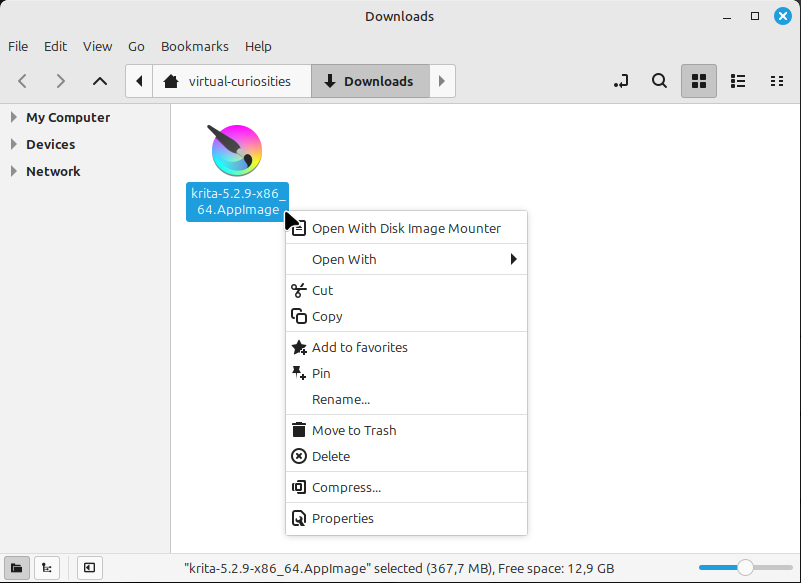
A window of the Nemo file manager with a file selected, a black mouse cursor hovering over it. An open context menu has the items: Open With Disk Image Mounter, Open With (has submenu), Cut, Copy, Add to Favorites, Pin, Rename..., Move to Trash, Delete, Compress..., and Properties.

Description

The context menu that appears when you right click on a file on Linux Mint's Nemo.

Metadada

File Type
image/webp
File Size
28.5KiB
Resolution
801x583px

Related Articles

  • How to Open the File Properties Dialog on Linux Mint

Share this page: send it to your friends!

View Comments

About the Site

  • Sitemap
  • Privacy Policy

Follow

Main Content © Virtual Curiosities 2023–2024.
Some Resources © Their Respective Authors.
Made with WordPress.