Virtual Curiosities

  • Websites
    • Search Engines
    • Social Media
  • Applications
    • For Digital Art
  • Tutorials & Tips
    • The Basics
    • Windows
    • GIMP
    • Krita
    • Inkscape
    • DaVinci Resolve
    • OBS Studio
    • WordPress (PHP Programming)
  • Reference
    • Hardware (Concepts)
    • Names of Computer Parts
    • Software (Concepts)
    • File Extensions
    • User Interfaces
    • Images & Image-Editing (Concepts)
    • Video & Video-Editing (Concepts)
    • Games (Terminology)
    • Internet (Concepts)
How to Use Cell Coordinates and Range Codes in LibreOffice Calc

LibreOffice Calc: INDIRECT (2025)

Share
2025-02-07
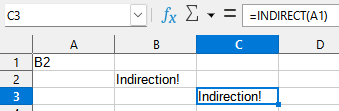
A spreadsheet with three non-empty cells. A1 reads "B2." B2 reads "Indirection!" The cell C3 is selected and also reads "Indirection!" A text box reads "=INDIRECT(A1)".

Description

How pointers work, explained using a spreadsheet in LibreOffice Calc.

Metadada

File Type
image/webp
File Size
2.1KiB
Resolution
339x111px

Related Articles

  • How to Use Cell Coordinates and Range Codes in LibreOffice Calc

Share this page: send it to your friends!

View Comments

About the Site

  • Sitemap
  • Privacy Policy

Follow

Main Content © Virtual Curiosities 2023–2024.
Some Resources © Their Respective Authors.
Made with WordPress.