SATA

Share

What is "SATA" in a Computer?

SATA (as in SATA cables, SATA ports, and SATA connectors) is a type of connector used in your PC to connect your motherboard to your hard disk drives (HDDs) and solid state drives (SSDs). That is, in order to install a new HDD or SDD in your computer, you need to connect it to the motherboard using a SATA data cable to one of the available SATA ports on the motherboard, and use a SATA power cable to connect the drive to the PSU (power supply unit).

What does a SATA Cable Look Like?

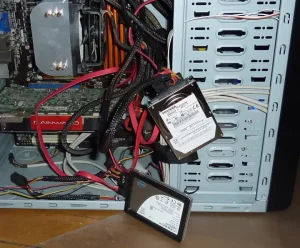
The SATA data cable is typically red and flat. The SATA power cable usually has a larger connector and a few colored cables (red, black, and yellow, specifically) attached to it.

Typically, the SATA power cables will come with your PSU. A good PSU may come with sleeved power cables, in which case they will have a black covering protecting them.

Where are SATA Ports Located in the Motherboard?

SATA ports are typically found in a corner below the RAM ports, on the side that faces the front panel of the PC.

Images
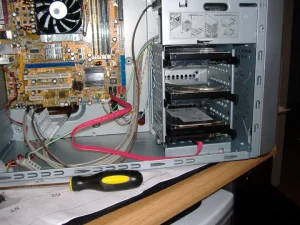
An open PC case. In it a large orange electronic board can be seen. On its bottim-right corner, 2 black ports and 2 red ports can be see. On the black port a red, flat cable is connected. The other end of the cable is connected to a metallic device in a device inside the PC, behind the front panel. Above the device similar devices can be seen stacked one on top of the other.
A SATA cable (red, center) connecting the motherboard (large electronic board) to a drive (bottom-right). Photo: Steve W on Flickr. License: CC BY-SA 2.0.
A PC case opened, various cables coming out of it. Thick black cables and red flat cables connect to two devices hanging out of the PC by the cables. The first device is a thick metallic rectangular block that reads "Toshiba." The second is flatter and has the Intel logomark.
An HDD (larger, thicker drive) and a SSD (smaller, flatter drive) connected to a PC. The red cables are SATA data cables. The black cables are sleeved SATA power cables. Photo: Gilly on Flickr. License: CC BY 2.0.
Written by Noel Santos.

About the Author

I'm a self-taught Brazilian programmer graduated in IT from a FATEC. In a world of increasingly complex and essential computers, I decided to use my technical expertise in hardware, desktop applications, and web technologies to create an informative resource to make PC's easier to understand.

View Comments