Discovery!: Youtube Has an AI Powered Brainstorming Feature for Creators

Youtube: Inspiration AI Outline Example (2024)

Share
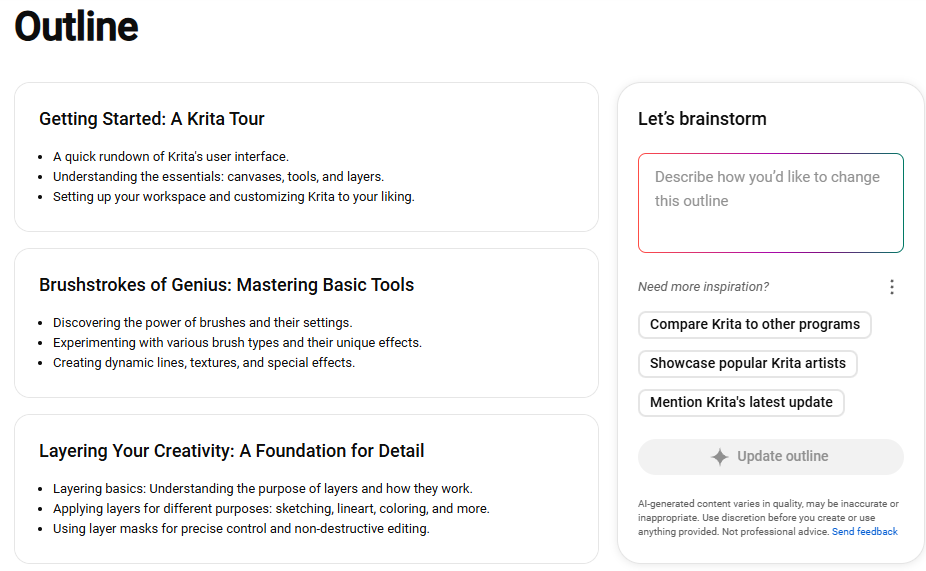
A page titled "Outline" in it 3 items with 3 a subtitle and 3 bullet points each. They read: Getting Started: A Krita Tour. Points: A quick rundown of Krita's user interface. Understanding the essentials: canvases, tools, and layers. Setting up your workspace and customizing Krita to your liking. Item 2: Brushtrokes of Genius: Mastering Basic Tools. Points: Discovering the power of brushes and their settings. Experimenting with various brush types and their unique effects. Creating dynamic lines, textures, and special effects. Item 3: Layering Your Creativity: A Foundation for Details. Points: Layering basics: Understanding the purpose of layers and how they work. Applying layers for different purposes: sketching, lineart, coloring, and more. Using layer masks for precise control and non-destructive editing. On the right pane, in a panel titled "Let's Brainstorm," a subsection reads: Need more inspiration? It has 3 clickable items: Compare Krita to other programs. Showcase popular Krita artists. Mention Krita's latest update. A button below reads "Update outline."

Description

An example of a video outline generated by AI on Youtube.

Metadada

File Type
image/webp
File Size
31.7KiB
Resolution
926x571px

View Comments