These are my personal notes on editing short videos for TikTok.
Free Reach
I've tried posting short videos on Youtube, Pinterest, Instagram, Tumblr, Bluesky, and TikTok. TikTok always gives me a few hundred views, while other platforms give me nothing.
I don't think this has anything to do with the content of the video itself. It's possible that larger platforms shy from algorithmically showing random content posted by new users to the rest of the users, preferring established users who are unlikely to have posted weird or offensive things. I think this algorithmic censorship is a good thing for these platforms as it protects their users, although it does put an obstacle on newcomers getting any views. It's a good thing that the web is as vast and varied as it is, so just as there are platforms with harsher censorship, there are also those with less censorship, and, ideally, you would be able to build an audience on platforms like TikTok that are easy to join and funnel that audience to censored platforms like Youtube where it's harder to gain subscribers.
Audience
TikTok is a platform for short, vertical video, i.e. taken by smartphones. I'm making tutorials for PC, and I REALLY don't like smartphones. Words can barely describe how much I don't like smartphones. So why am I making PC video tutorials for TikTok?
I have to edit every video with panning and freeze frames because no window can fit at TikTok's resolution.
However, I think that people who don't know how to use a PC are using TikTok. I posted a video about how to create a folder. It got 1500 views in a day, 36 likes, zero comments, 5 bookmarks, and gained me 14 new followers.
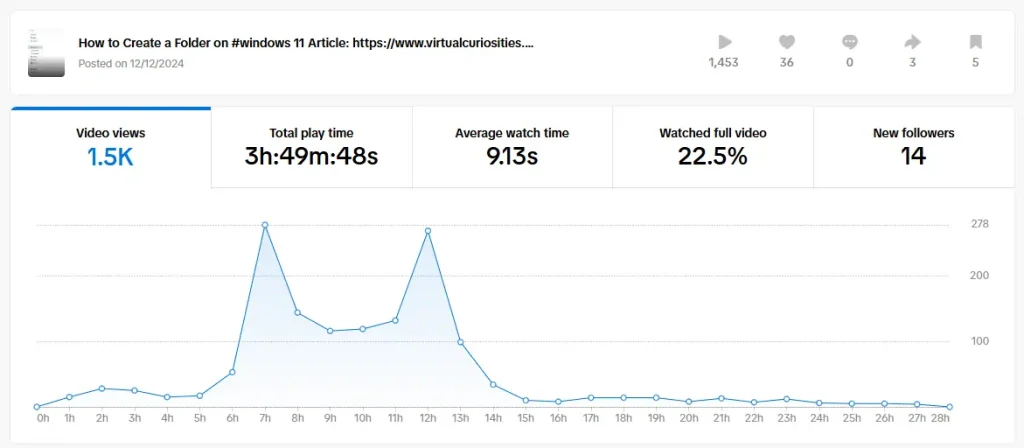
Who bookmarked this? No, I don't want to know. I'm going to pretend they just did all of this because of the background music, which was a Super Mario track, which I don't think I should have the license to use in my video, but TikTok's video editor let me use it, so that's TikTok's problem now.
By contrast, my normal resolution video on Youtube about the same thing got 31 views in a day, zero likes, zero subscribers, zero comments. Let's hope this is a turtle vs. rabbit kind of thing.
A plus side of making short videos for TikTok is that I can also post the same video on Instagram, Pinterest, etc. Almost every social media "app" is smartphone-first, so narrow videos work better with them. Youtube's interface, on the other hand, works better with wider videos.
Resolution & Aspect Ratio
The aspect ratio of TikTok videos is 9:16 (or 0.5625). The documentation says the minimum resolution is 720x1280px.
[...] Uploaded videos must be:
https://support.tiktok.com/en/using-tiktok/creating-videos/creator-tools-on-tiktok (accessed 2024-12-13)
- In MP4 or WebM file format
- 720x1280 resolution or higher
- Up to 30 minutes in length
- Less than 10 GB
That's news to me, because the videos I uploaded are 504x896px, which is the same aspect ratio, just smaller.
I record the screen at a 1600x900px resolution. 900px is less than 1280px. So unless I find something 380px tall to pad the 1/4th of the vertical space of the video with, I don't think there is any point in doing this at all.
But I guess I'll try to pad it just once to see how it looks.
When considering video resolutions on mobile, it's important to keep in my that users look at the screen at a far shorter distance than they would look at a monitor. You can experiment this yourself. Hold your smartphone at the usual distance while seated in front of a monitor. In my case, my phone screen appears taller than my monitor screen, because it's closer to my face. Size measured as how big something looks from your eye vision's perspective is measured in arcdegrees not in pixels. A high resolution smartphone typically isn't bigger, it simply has a higher pixel density.
Safe Zone
TikTok's interface covers part of the bottom area of the video with text, so it's a good idea to avoid putting important stuff there. There are also some interface elements that appear at the very top, like the volume button.
Youtube shorts also displays its interface similarly, so the bottom part should be avoided, and the very top as well.
On mobile, there are also buttons like the like button on the right side. But the left side should be safe enough.
Finally, it seems that TikTok scales the video to fill the height of the viewport on mobile. This means that if your video is 720x1280px, but the user's mobile screen is 600x1280px, TikTok will crop it so 60px from the left side and 60px from the right side will be hidden.
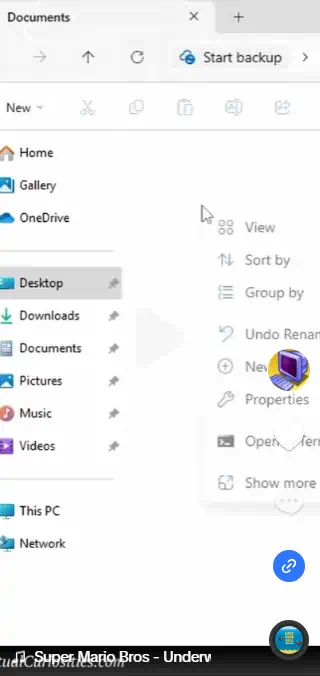
The center is the only thing safe in this app. Everything else is a risk. At this point I don't even know if it's a video app anymore, it's like an audio app that has some video that you can barely see.
I found an article that talks about this in more detail:
Music
The most important thing about short music videos is the music. Ideally, you would have a specific track you want to use, and you would save your video with that music in it. However, in most cases you won't have the license to do that, so it's better not to do that.
There are some websites that provide royalty free music, such as Incompetech. You can download MP3's from there and just save it in your video, so long as you give the credit. This can become problematic, ethically speaking, because in many cases people WILL be able to download your video and redistribute it, so even if you give credit in your post that doesn't mean they will. Fortunately, that's not your problem, legally speaking, because you distributed it correctly, giving attribution as the Creative Commons license required, and it's other people who are wrong for forgetting the attribution. But it's still not fair to the musician who composed the music, so preferably you would add the credit INTO the video, e.g. as a watermark, so even if it's shared, people know where the music came from.
If you don't have access to the music, you'll pick one from TikTok's editor. While this is okay and can give you good results, there is one little thing that is worth knowing about.
Youtube has its own editor with its own music that you can choose for your Youtube Shorts. It has a completely different library of music. This means that the song you pick on TikTok may not be available for picking on Youtube Shorts, or in any other platforms that allow you to add music to your video.
Rhythm
Since short videos are short and people's attention span is 9.13 seconds, you'll want to make very fast, very short cuts, to deliver the message before your audience swipes away. But, most importantly, you'll want to synchronize the cuts to the music. Because it looks way more satisfying when that happens.
This is very easy if you do have access to the MP3 file. Just load the music into DaVinci Resolve, and edit the cuts according to the beat. But if you don't have the MP3, and you're picking the songs from TikTok's editor, how can you do this? There is one simple trick. Just think about the BPM, Beats Per Minute.
If a song has a 60 BPM, 120 BPM, or 180 BPM, then the beats are aligned to the seconds. This means if you have 10 cuts, each 1 second long, in a 10-second video, you can choose ANY 120 BPM song and it's going to fit.
In a 90 BPM song, the first beat will occur at 0.75 seconds, the second at 1.5 seconds, the third at 2.25 seconds, and the third at 3.00 seconds. BPM isn't the minimum speed of the beats. You can have a 60 BPM song that has a "half-beat" sometimes, i.e. two beats happen very fast, which means it's 120 BPM for a few notes. These facts combined mean that, typically, half-second are also good marks, and quarter-seconds too. But ideally you would stick to the second mark.
Note: in my case, I often edit only a single clip using retiming controls for free frames, so instead of "cuts" I align things like interactions and outcomes to the beat, e.g. if you press a button and a folder appears, the appearance of the folder is where the beat should be aligned to.
Tip: if you're going to use a song that already exists in TikTok, you can right click on a TikTok video to download the video, then import the downloaded file into your video editor to use the background music as reference. It should work so long as the video you download is longer than the video you're about to make.
Drop
Many popular songs have a "drop" that occurs after a few seconds. They seem to occur around the 10 second mark, but his varies considerably from song to song, BPM to BPM. If your video has two phases, that might be something worth accounting for.
Foot Traffic
TikTok has a relational database of songs to videos. Every video that uses a song has a link to the song in its description, and clicking on that link goes to a webpage that lists all videos on TikTok that use that song.
This means that you can gain foot traffic to your TikTok video by using a song that is being popularly searched for.
Presumably, the only reason a user would click on a link to see more videos that use a song is if that song is being used by a lot of memes on the platform recently. I don't really have the energy to keep up with TikTok memes, but, if you can, that's one opportunity to consider.
I will try to this approach at least once, though, just to see if it works.
Examples
I tried making a video with centralized watermark, matched to music, and padded at the bottom. This "short" video ended up being only one second shorter than the long version of the same video, which is kind of worrying.