Virtual Curiosities

  • Websites
    • Search Engines
    • Social Media
  • Applications
    • For Digital Art
  • Tutorials & Tips
    • The Basics
    • Windows
    • GIMP
    • Krita
    • Inkscape
    • DaVinci Resolve
    • OBS Studio
    • WordPress (PHP Programming)
  • Reference
    • Hardware (Concepts)
    • Names of Computer Parts
    • Software (Concepts)
    • File Extensions
    • User Interfaces
    • Images & Image-Editing (Concepts)
    • Video & Video-Editing (Concepts)
    • Games (Terminology)
    • Internet (Concepts)
How to Generate a SSH Key on Linux Mint

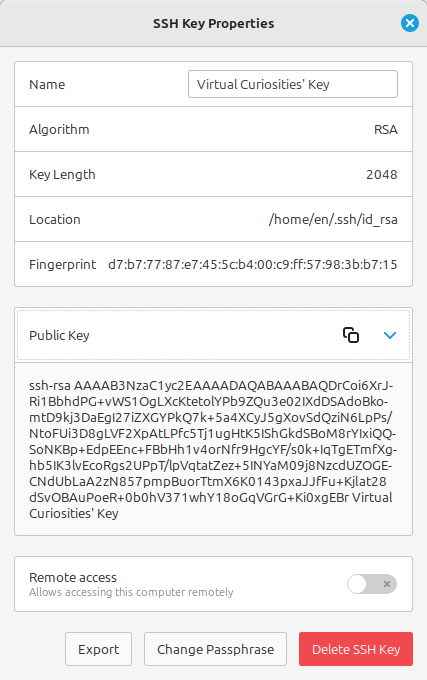
Seahorse: "SSH Key Properties" Dialog

Share
2024-09-28
A dialog titled "SSH Key Properties" showing various fields: Name: "Virtual Curiosities' Key", Algorithm: RSA, Key Length: 2048, Location: /home/en/.ssh/id_rsa, a Fingerprint with several hexadecimal numbers, a public key that is a long text starting with ssh-rsa, following by random text characters, and ending in "Virtual Curiosities' Key," a switch "Remote Access (Allow accessing this computer remotely)", and three buttons: Export, Change Passphrase, and Delete SSH Key.

Description

The SSH Key Properties dialog on Seahorse, with the Public Key field expanded.

Metadada

File Type
image/webp
File Size
25.3KiB
Resolution
427x680px

Related Articles

  • How to Generate a SSH Key on Linux Mint

Share this page: send it to your friends!

View Comments

About the Site

  • Sitemap
  • Privacy Policy

Follow

Main Content © Virtual Curiosities 2023–2024.
Some Resources © Their Respective Authors.
Made with WordPress.